The ZIPCODE player guide
A real-map city sandbox: pick your zip code, drop in, and make the city yours. Everything you need to know, section by section. Press F1 in the game for the controls at any time.
🚀 Getting started
ZIPCODE is a multiplayer city sandbox built from real maps. Pick a US zip code, drop in, and play in the real streets there with everyone else: drive, work, race, fight, buy a home, start a crew. It runs in your browser on a computer, a phone or a tablet, with keyboard and mouse, a controller or touch.
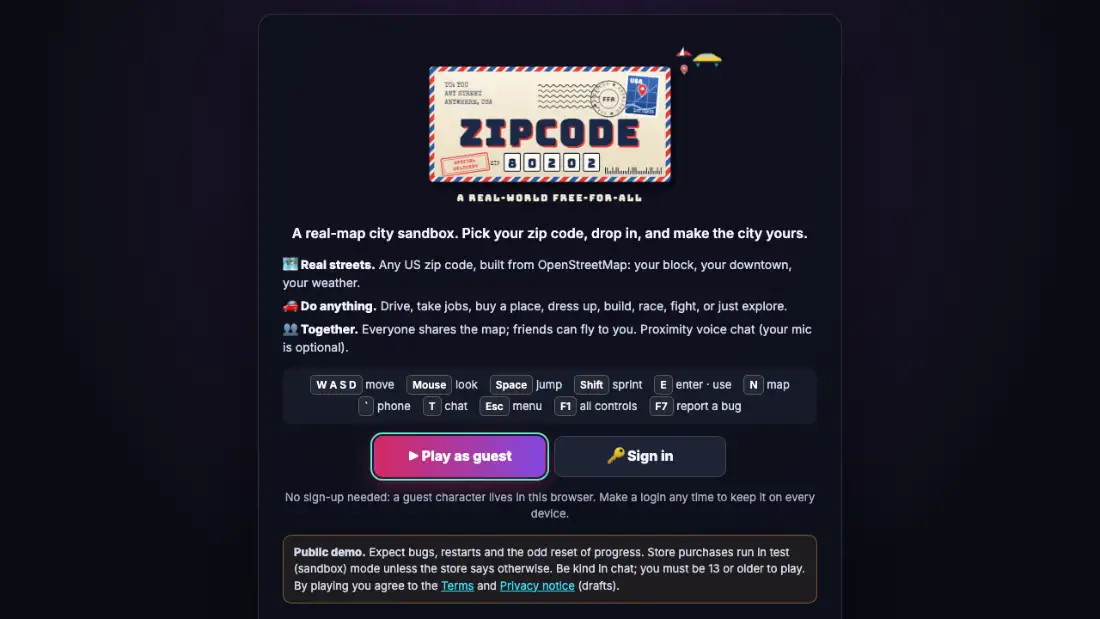
Your first minute
- Play as guest or Sign in. A guest starts straight away with no sign-up. You can link a login later and keep everything (see Guest vs linked accounts).
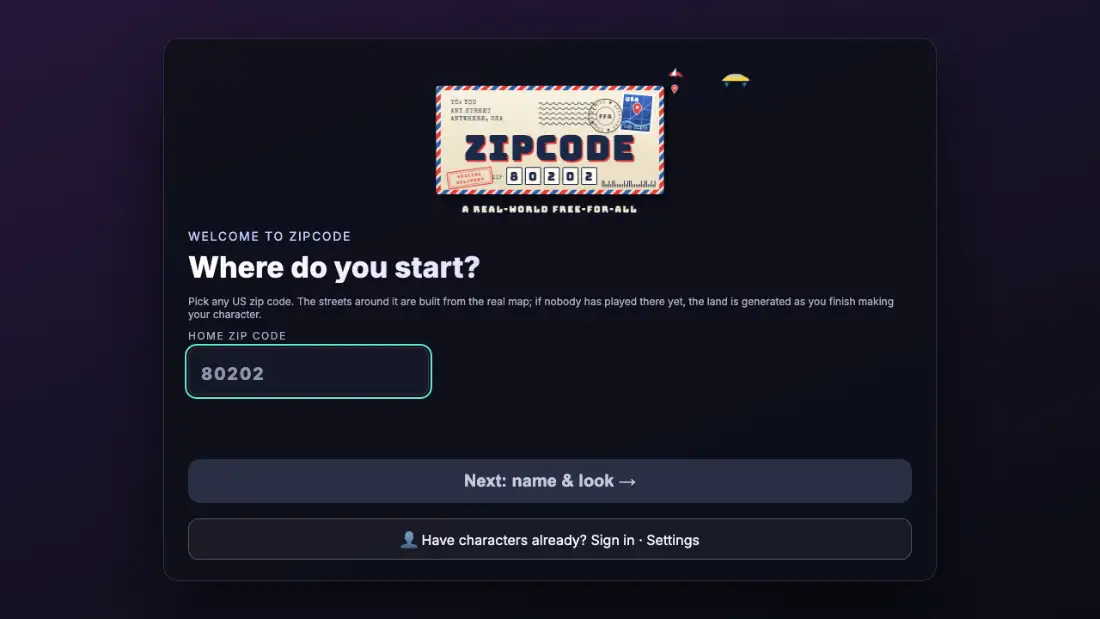
- Pick a zip code. Type any 5-digit US zip. Downtown Denver is built in; anywhere else is generated the first time someone goes there, which takes a few seconds. Friends within about 60 km of each other share the same world.
- Make your character. Body, face, skin, hair, clothes, walking style and a name. You can change most of it later (Customize, C).
- Drop in. A flying taxi drops you over your zip. If you're in the air, Space opens a parachute.
What's on the screen
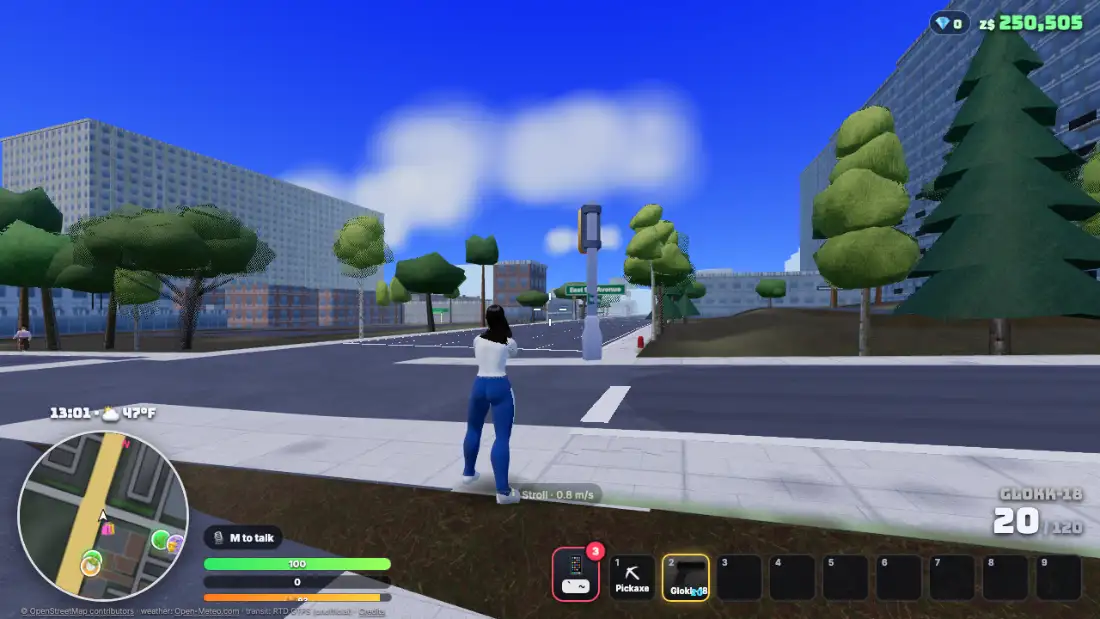
- Top right: your money (Z$) and Zip Credits (💎).
- Bottom left: the minimap (press N for the big map), the time and weather, the voice chip, and your health, armour and hunger bars.
- Bottom middle: the 📱 phone button and your hotbar (slots 1-9). Slot 1 is your pickaxe.
- Top right, under the money: the jobs you're on, with a ✕ to quit each one.
- The card on the left (first session): the one next thing to try. It notices when you've done it.
Good first things to do
- Open the phone (` or the 📱 button) and look around the apps.
- Walk up to a glowing door and press E to go in. Shops, bars, banks, gas stations and clubs all have something.
- Get in a car (E at a car). If there's no free car near a new player, a loaner is parked in front of you.
- Take a job: talk to staff (E) inside a venue, or open the phone's 🛵 Oober Eats or 🚕 Taxi app.
- Press F1 any time for every control.
If you die
The screen says RETURN TO SENDER and you're back on your feet after a few seconds with a basic kit. Everything you were carrying (except your pickaxe) drops in a bag where you fell, and anyone can search it, so go back for it quickly. Your Z$, cars, homes and cosmetics stay yours. If you had a bounty (wanted stars), whoever got you collects it.
The pause menu
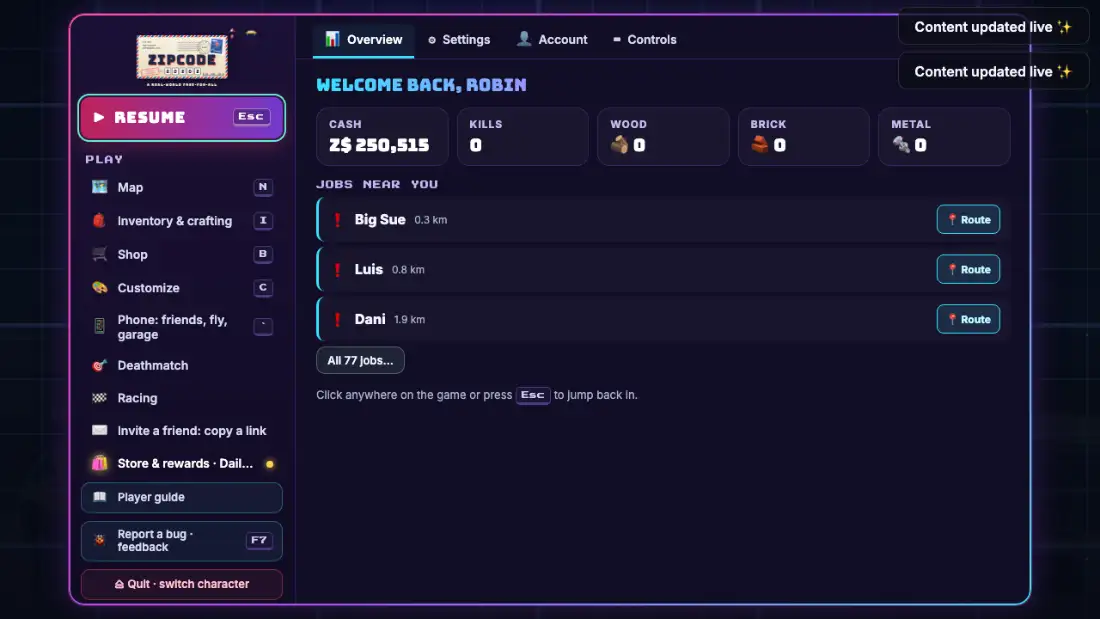
Press Esc. The left side has Resume, the main screens (map, inventory, shop, customize, phone, store) and at the bottom 📖 Player guide, 🐞 Report a bug and Quit. The tabs on top hold Settings, your Account and the Controls sheet.
🎮 Controls
Press F1 in the game for this list, with a search box. Every key can be changed in Esc → Settings → Controls (the middle and side mouse buttons can be picked too). The game notices what you're using (keyboard, controller or touch) and shows the right prompts.
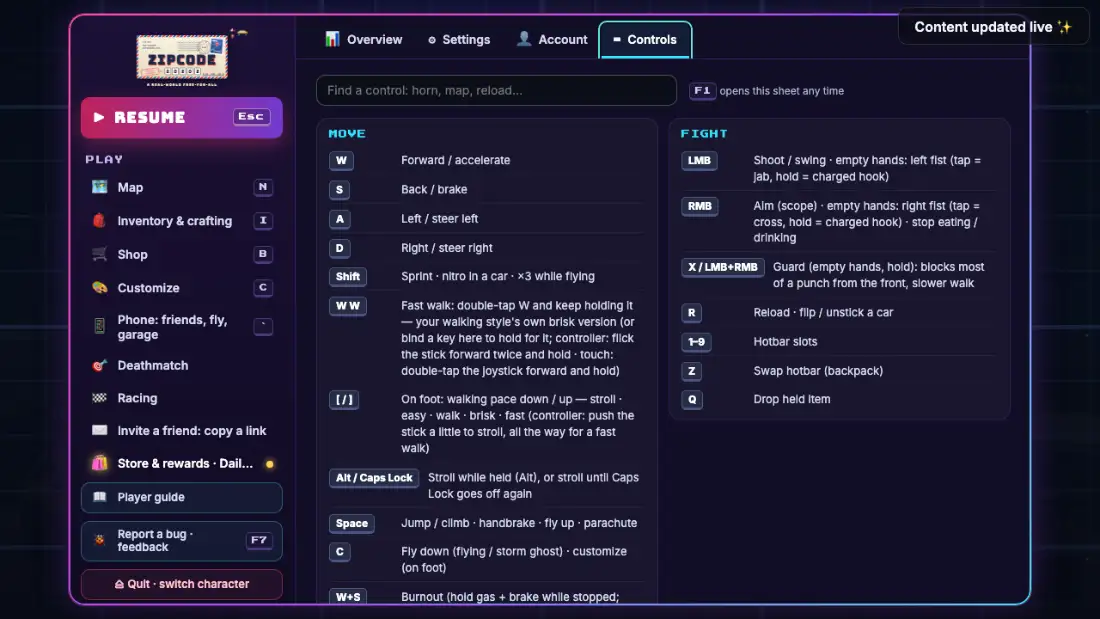
Keyboard and mouse
Click the game to capture the mouse; the mouse looks around, the wheel zooms in third person.
Move
| W | Forward / accelerate |
| S | Back / brake |
| A | Left / steer left |
| D | Right / steer right |
| Shift | Sprint · nitro in a car · ×3 while flying |
| W W | Fast walk: double-tap W and keep holding it — your walking style's own brisk version (or bind a key here to hold for it; controller: flick the stick forward twice and hold · touch: double-tap the joystick forward and hold) |
| [ / ] | On foot: walking pace down / up — stroll · easy · walk · brisk · fast (controller: push the stick a little to stroll, all the way for a fast walk) |
| Alt / Caps Lock | Stroll while held (Alt), or stroll until Caps Lock goes off again |
| Space | Jump / climb · handbrake · fly up · parachute |
| C | Fly down (flying / storm ghost) · customize (on foot) |
| W+S | Burnout (hold gas + brake while stopped; steer to swing the tail) |
| Ctrl | Crouch · slide (while sprinting or landing) |
| Mouse 4 | 💨 Fart (on foot; mouse 4 = the back button on the side of the mouse): hold to charge, let go to launch forward — let go just as the bar fills for a perfect one, hold on too long and it goes wrong; once more in the air = a double jump (controller: hold R3 · touch: 💨) |
| F / Y | Inspect your weapon (F or Y; controller: hold X) · with a sword in hand Y sheathes / draws it instead (F still inspects) · Y by a trailer = hitch (see Vehicles) |
| V | First / third person (third person: orbit freely, wheel zooms) |
Fight
| LMB | Shoot / swing · empty hands: left fist (tap = jab, hold = charged hook) |
| RMB | Aim (scope) · empty hands: right fist (tap = cross, hold = charged hook) · stop eating / drinking |
| X / LMB+RMB | Guard (empty hands, hold): blocks most of a punch from the front, slower walk |
| R | Reload · flip / unstick a car |
| 1–9 | Hotbar slots |
| Z | Swap hotbar (backpack) |
| Q | Drop held item |
Vehicles
| E | Enter / exit · talk · use · at a gas pump / charger: get out and fill up |
| F | Take the wheel (passenger) · use a venue station (controller: hold D-pad → on foot) |
| H | Horn (hold to keep honking) |
| [ | Left turn signal (press again to cancel; cancels itself after the turn) |
| ] | Right turn signal |
| \ | Hazard lights |
| G | Flying cars: take off / land (Space/C up/down) |
| Y | 🛻 Towing: hitch a trailer (back your ball up to its coupler) / unhitch · strap your car down on a hauler · winch your boat on · let a floating boat go. On foot, E at a trailer: ramps, unstrap, unhitch, winch |
| X / Z | 🪨 4x4 (in a 4x4): X = drive mode (2H / 4H / 4L, lockers), Z = crawl control |
| U | Mod shop menu (on a shop's pad) |
| L | Key fob: lock / unlock your nearest car (it also unlocks as you walk up) |
| Backspace ×2 | Quit the job you're on (press twice to confirm; controller: Start → Quit job) |
| ; | 📻 Car radio: previous station (driver; controller: hold D-pad ←) |
| ' | 📻 Car radio: next station — your Spotify playlists come after the stations (controller: hold D-pad →; phone → 📻 Radio for everything) |
| , | 🎵 Spotify in the car: skip to the next track (driver) |
Build
| G | Build mode on / off |
| X | Material (build mode) |
| R | Rotate piece (build mode) |
World
| = | Accept a deathmatch invite (or 🎯 on your phone) |
| − | Decline a deathmatch invite |
| 0 | 🎵 Trend wheel: pick a trend move to perform (on foot). In a taxi or Oober Eats offer, 0 declines it |
| N | Map (drag pan · scroll zoom · right-click actions) |
| I | Inventory |
| B | Shop |
| K | Homes: real estate listings + your homes |
| J | Decorate your home · park in your garage (at its door) |
| P | Character & wardrobe (clothes) |
| Shift+P / F2 | Photo mode: free camera, filters, poses, capture + share a link |
| Tab | Scoreboard |
| . / MMB | Inspect the player (or car) you're aiming at within 15 m: what they wear, how to get it (controller: hold D-pad ↓) |
Racing
| R | Racing: back to the last checkpoint |
| Tab | Racing: the standings |
| Space | Watching a race: follow the next car |
| PgUp / PgDn | Sky track builder: the last point higher / lower |
| [ / ] | Sky track builder: bank the last point |
| J / L | Sky track builder: the last point is a jump / a loop |
Track builder
| F | Track builder: a checkpoint here (the first is the start / finish line) |
| Q | Track builder: a turn marker here (the racing line goes through it) |
| Backspace | Track builder: undo the last marker / checkpoint |
| B | Track builder: start / finish: back at the start = close the lap (circuit), elsewhere = the finish line (sprint) |
| G | Track builder: the start grid here (the pole, facing your way) |
| C | Track builder: circuit (laps) / sprint (A to B) |
| L | Track builder: laps 1-10 |
| X | Track builder: record line: a turn marker at every turn you drive |
| P | Track builder: preview lap (a ghost car drives the route; again to stop) |
| I | Track builder: name, check, test drive, submit (the phone) |
| Y | Track builder: props (boosts, ramps, jumps…): build mode |
Social
| ` | Phone: friends, fly to a zip / a friend, garage delivery, wallet, camera (controller: tap D-pad →, or hold D-pad ↑) |
| T / Enter / / | Chat (/ opens it ready for a command: /help · /storm join drops you into a running storm) |
| M | Voice chat: hold to talk (push to talk, the default) · open mic: mute / unmute (Settings → Sound) |
| Esc | Menu · close whatever is open |
| F1 | This controls sheet (help) |
| F7 | 🐞 Report a bug / send feedback (also in the Esc menu) |
What each key does where
The same key does different things depending on what you are doing. Settings > Controls has a search bar for this (type a key, an action like "shoot" or "honk", or a situation like "boat").
🚶 On foot
| W | Walk forward (double-tap and keep holding = fast walk) |
| A | Strafe left |
| S | Walk backward |
| D | Strafe right |
| W W | Fast walk: double-tap W and keep holding it (or bind a key here to hold for it) |
| Shift | Sprint (hold) |
| Alt | Stroll while held (a slow, easy walk) |
| Right Alt | Stroll while held (same as Alt) (fixed key) |
| Caps Lock | Stroll until Caps Lock goes off again (fixed key) |
| [ | Walking pace down (stroll, easy, walk, brisk, fast) |
| ] | Walking pace up (stroll, easy, walk, brisk, fast) |
| Space | Jump · climb up a ledge · open the parachute while falling (again = cut away) |
| Ctrl | Crouch · slide (while sprinting or landing) |
| Right Ctrl | Same as Ctrl: crouch / dive (fixed key) |
| C | Customize your character (opens the creator) |
| V | First / third person camera |
| Mouse (move) | Look around (click the game first to grab the mouse; Esc gives it back) (fixed key) |
| Right mouse (RMB) | Stop eating / drinking (fixed key) |
| Middle mouse (MMB) | Inspect the player (or car) you are aiming at within 15 m (fixed key) |
| Mouse 4 (back button) | Fart: hold to charge, let go to launch forward (perfect when the bar fills; once more in the air = double jump) |
| Mouse 5 (forward button) | Free to bind (no action by default) (fixed key) |
| Mouse wheel | First person: cycle your hotbar · third person: zoom the camera in / out (fixed key) |
| Y | Towing: hitch / unhitch a trailer, strap your car down, winch your boat on, let a boat go |
| X | Guard (empty hands, hold): blocks most of a punch from the front |
| Z | Swap the hotbar (backpack row) |
| Q | Drop the held item |
| 1-9 | Pick hotbar slot 1-9 (fixed key) |
| 1-9 | While the trend wheel is open: pick move 1-9 (fixed key) |
| 0 | Trend wheel: pick a trend move to perform (fixed key) |
| Numpad 1-9 | Same as 1-9 for taxi quotes, delivery offers and the trend wheel (fixed key) |
| Numpad 0 | Same as 0: decline an offer / close the trend wheel (fixed key) |
| E | Interact: enter a car, board a boat or ride, talk, use a door / shop / station, pick up loot |
| E | At a gas pump / charger: get out and fill up |
| F | Use a venue station (counter, arcade machine, dancer) · inspect your weapon |
| G | Build mode on / off |
| L | Key fob: lock / unlock your nearest car |
| Backspace | Quit the job you are on (press twice to confirm) |
| N | Open the big map |
| I | Open the inventory |
| B | Open the shop |
| K | Homes: real estate listings and your homes |
| J | Decorate your home · park in your garage (at its door) · hop on / off your bike or board · park in your lair / chop shop |
| P | Character and wardrobe (clothes) |
| P | Shift+P: photo mode on / off |
| Tab | Scoreboard (hold) |
| . (period) | Inspect the player (or car) you are aiming at within 15 m: what they wear and how to get it |
| ` (backtick) | Open / close the phone: friends, fly to a zip or a friend, garage, wallet, camera, apps |
| T | Open chat |
| Enter | Open chat (fixed key) |
| / | Open chat ready for a command (/help, /storm join drops you into a running storm) (fixed key) |
| Numpad / | Open chat ready for a command (same as /) (fixed key) |
| Esc | Open the pause menu (map, settings, controls, account) (fixed key) |
🚗 In a car
| W | Gas: accelerate |
| A | Steer left |
| S | Brake / reverse (with W at a standstill: burnout) |
| D | Steer right |
| Shift | Nitro boost |
| Right Shift | Same as Shift: nitro / sprint / boost (fixed key) |
| [ | Left turn signal (press again to cancel) |
| ] | Right turn signal (press again to cancel) |
| \ | Hazard lights |
| Space | Handbrake (drift) |
| V | First / third person camera |
| Mouse (move) | Look around (click the game first to grab the mouse; Esc gives it back) (fixed key) |
| Mouse wheel | Zoom the chase camera (third person) (fixed key) |
| R | Flip the car upright / free it when stuck |
| Y | Towing: hitch / unhitch a trailer, strap your car down, winch your boat on, let a boat go |
| X | 4x4: drive mode (2H / 4H / 4L, lockers) |
| Z | 4x4: crawl control |
| E | Exit the vehicle |
| H | Horn (hold to keep honking) |
| U | Mod shop menu (on a shop pad) |
| L | Key fob: lock / unlock your nearest car |
| Backspace | Quit the job you are on (press twice to confirm) |
| ; | Car radio: previous station (driver) |
| ' | Car radio: next station (your Spotify playlists come after the stations) |
| , | Spotify in the car: skip to the next track |
| N | Open the big map |
| I | Open the inventory |
| Tab | Scoreboard (hold) |
| ` (backtick) | Open / close the phone: friends, fly to a zip or a friend, garage, wallet, camera, apps |
| T | Open chat |
| Enter | Open chat (fixed key) |
| / | Open chat ready for a command (/help, /storm join drops you into a running storm) (fixed key) |
| Numpad / | Open chat ready for a command (same as /) (fixed key) |
| Esc | Open the pause menu (map, settings, controls, account) (fixed key) |
| Arrow Up | Same as W: accelerate (fixed key) |
| Arrow Down | Same as S: brake / reverse (fixed key) |
| Arrow Left | Same as A: steer left (fixed key) |
| Arrow Right | Same as D: steer right (fixed key) |
💺 Passenger
| V | First / third person camera |
| Mouse (move) | Look around (click the game first to grab the mouse; Esc gives it back) (fixed key) |
| Left mouse (LMB) | Shoot out of the window (passenger) (fixed key) |
| Mouse wheel | Zoom the chase camera (third person) (fixed key) |
| R | Reload (passenger) |
| Y | Towing: hitch / unhitch a trailer, strap your car down, winch your boat on, let a boat go |
| E | Exit the vehicle |
| F | Take the wheel (when the driver left) |
| N | Open the big map |
| I | Open the inventory |
| Tab | Scoreboard (hold) |
| ` (backtick) | Open / close the phone: friends, fly to a zip or a friend, garage, wallet, camera, apps |
| T | Open chat |
| Enter | Open chat (fixed key) |
| / | Open chat ready for a command (/help, /storm join drops you into a running storm) (fixed key) |
| Numpad / | Open chat ready for a command (same as /) (fixed key) |
| Esc | Open the pause menu (map, settings, controls, account) (fixed key) |
🏍 Motorbike
| W | Throttle / pedal |
| A | Steer / carve left (in the air: spin) |
| S | Brake |
| D | Steer / carve right (in the air: spin) |
| Shift | Sprint · pedal harder |
| Right Shift | Same as Shift: nitro / sprint / boost (fixed key) |
| [ | Left turn signal (press again to cancel) |
| ] | Right turn signal (press again to cancel) |
| \ | Hazard lights |
| Space | Hop (hold = rear-brake slide) |
| V | First / third person camera |
| Mouse (move) | Look around (click the game first to grab the mouse; Esc gives it back) (fixed key) |
| X | Lean forward (stoppie, nose manual, frontflip) |
| Q | Lean back (wheelie, manual, backflip) |
| E | Get off |
| H | Horn (hold to keep honking) |
| N | Open the big map |
| ` (backtick) | Open / close the phone: friends, fly to a zip or a friend, garage, wallet, camera, apps |
| T | Open chat |
| Esc | Open the pause menu (map, settings, controls, account) (fixed key) |
| Arrow Up | Same as W: accelerate (fixed key) |
| Arrow Down | Same as S: brake / reverse (fixed key) |
| Arrow Left | Same as A: steer left (fixed key) |
| Arrow Right | Same as D: steer right (fixed key) |
🚲 Bicycle
| W | Throttle / pedal |
| A | Steer / carve left (in the air: spin) |
| S | Brake |
| D | Steer / carve right (in the air: spin) |
| Shift | Sprint · pedal harder |
| Right Shift | Same as Shift: nitro / sprint / boost (fixed key) |
| Space | Bunny hop |
| V | First / third person camera |
| Mouse (move) | Look around (click the game first to grab the mouse; Esc gives it back) (fixed key) |
| X | Lean forward (stoppie, nose manual, frontflip) |
| Q | Lean back (wheelie, manual, backflip) |
| E | Get off |
| H | Horn (hold to keep honking) |
| N | Open the big map |
| ` (backtick) | Open / close the phone: friends, fly to a zip or a friend, garage, wallet, camera, apps |
| T | Open chat |
| Esc | Open the pause menu (map, settings, controls, account) (fixed key) |
| Arrow Up | Same as W: accelerate (fixed key) |
| Arrow Down | Same as S: brake / reverse (fixed key) |
| Arrow Left | Same as A: steer left (fixed key) |
| Arrow Right | Same as D: steer right (fixed key) |
🛹 Skateboard
| W | Push off / roll on |
| A | Steer / carve left (in the air: spin) |
| S | Powerslide / slow down |
| D | Steer / carve right (in the air: spin) |
| Shift | The bigger trick version (varial / 360 flips) |
| Space | Hold to crouch, release to ollie (jump) |
| V | First / third person camera |
| Mouse (move) | Look around (click the game first to grab the mouse; Esc gives it back) (fixed key) |
| X | Lean forward (stoppie, nose manual, frontflip) |
| Q | Lean back (wheelie, manual, backflip) |
| E | Get off |
| N | Open the big map |
| ` (backtick) | Open / close the phone: friends, fly to a zip or a friend, garage, wallet, camera, apps |
| T | Open chat |
| Esc | Open the pause menu (map, settings, controls, account) (fixed key) |
⛷ Skis / snowboard
| W | Push off / roll on |
| A | Steer / carve left (in the air: spin) |
| S | Powerslide / slow down |
| D | Steer / carve right (in the air: spin) |
| Shift | The bigger trick version (varial / 360 flips) |
| Space | Hold to crouch, release to ollie (jump) |
| Space | Chairlift: jump off early |
| V | First / third person camera |
| Mouse (move) | Look around (click the game first to grab the mouse; Esc gives it back) (fixed key) |
| X | Lean forward (stoppie, nose manual, frontflip) |
| Q | Lean back (wheelie, manual, backflip) |
| E | Get off |
| E | Ride a chairlift (at the bottom station) · get off a bus / train at the next stop |
| N | Open the big map |
| ` (backtick) | Open / close the phone: friends, fly to a zip or a friend, garage, wallet, camera, apps |
| T | Open chat |
| Esc | Open the pause menu (map, settings, controls, account) (fixed key) |
⛵ Boat
| W | Throttle forward |
| A | Steer left |
| S | Reverse / brake (sailboat: let the sail fly) |
| D | Steer right |
| Shift | Boost (sailboat: run the engine) |
| Right Shift | Same as Shift: nitro / sprint / boost (fixed key) |
| [ | Left turn signal (press again to cancel) |
| ] | Right turn signal (press again to cancel) |
| \ | Hazard lights |
| V | First / third person camera |
| Mouse (move) | Look around (click the game first to grab the mouse; Esc gives it back) (fixed key) |
| E | Get off |
| H | Horn (hold to keep honking) |
| N | Open the big map |
| ` (backtick) | Open / close the phone: friends, fly to a zip or a friend, garage, wallet, camera, apps |
| T | Open chat |
| Esc | Open the pause menu (map, settings, controls, account) (fixed key) |
| Arrow Up | Same as W: accelerate (fixed key) |
| Arrow Down | Same as S: brake / reverse (fixed key) |
🛸 Flying car / flying
| W | Fly forward |
| A | Turn left (yaw) |
| S | Fly backward / air brake |
| D | Turn right (yaw) |
| Shift | Boost: fly 3x faster |
| Right Shift | Same as Shift: nitro / sprint / boost (fixed key) |
| Space | Fly up (climb) |
| C | Fly down (descend) |
| V | First / third person camera |
| Mouse (move) | Look around (click the game first to grab the mouse; Esc gives it back) (fixed key) |
| G | Flying car: take off / land |
| N | Open the big map |
| ` (backtick) | Open / close the phone: friends, fly to a zip or a friend, garage, wallet, camera, apps |
| T | Open chat |
| Esc | Open the pause menu (map, settings, controls, account) (fixed key) |
| Arrow Up | Same as W: accelerate (fixed key) |
| Arrow Down | Same as S: brake / reverse (fixed key) |
🏊 Swimming
| W | Swim forward |
| A | Swim left |
| S | Swim backward |
| D | Swim right |
| Shift | Swim fast |
| Ctrl | Dive |
| Right Ctrl | Same as Ctrl: crouch / dive (fixed key) |
| V | First / third person camera |
| Mouse (move) | Look around (click the game first to grab the mouse; Esc gives it back) (fixed key) |
| Mouse 4 (back button) | Fart: hold to charge, let go to launch forward (perfect when the bar fills; once more in the air = double jump) |
| N | Open the big map |
| ` (backtick) | Open / close the phone: friends, fly to a zip or a friend, garage, wallet, camera, apps |
| T | Open chat |
| Esc | Open the pause menu (map, settings, controls, account) (fixed key) |
🔫 Holding a gun
| Left mouse (LMB) | Shoot (hold for automatic fire) (fixed key) |
| Right mouse (RMB) | Aim (scope): hold (fixed key) |
| R | Reload |
| Y | Inspect your weapon |
| X | Silencer on/off · burst fire on/off (weapons that have them) |
| 1-9 | Pick hotbar slot 1-9 (fixed key) |
🎯 Aiming
| Right mouse (RMB) | Aim (scope): hold (fixed key) |
🥊 Melee / fists
| Left mouse (LMB) | Swing · fists: left fist (tap = jab, hold = charged hook) (fixed key) |
| Right mouse (RMB) | Right fist (tap = cross, hold = charged hook) · LMB + RMB = guard (fixed key) |
| Y | Sword: sheathe / draw it |
| X | Guard (empty hands, hold): blocks most of a punch from the front |
| 1-9 | Pick hotbar slot 1-9 (fixed key) |
🧱 Build mode
| Left mouse (LMB) | Place the piece (fixed key) |
| Right mouse (RMB) | Hold to show the lob for a thrown piece (fixed key) |
| R | Rotate the piece |
| X | Cycle the material |
| 1-9 | Pick the build piece 1-9 (fixed key) |
| E | Leave build mode |
🎒 Inventory
| Left mouse (LMB) | Pick up / click (fixed key) |
| Q | Drop the item under the cursor (fixed key) |
| 1-9 | Move the hovered item into hotbar slot 1-9 (fixed key) |
| I | Close the inventory |
| Esc | Close / back out of whatever is open (fixed key) |
☰ In a menu
| Space | Press the highlighted button (fixed key) |
| C | Customize (from the pause menu) |
| Left mouse (LMB) | Pick up / click (fixed key) |
| Tab | Move focus to the next button (Shift+Tab: back) (fixed key) |
| Enter | Confirm / submit the dialog (fixed key) |
| Numpad Enter | Same as Enter (fixed key) |
| Esc | Close / back out of whatever is open (fixed key) |
| Arrow Up | Move the highlight up (fixed key) |
| Arrow Up | Try-on mirror: zoom in (fixed key) |
| Arrow Down | Move the highlight down (fixed key) |
| Arrow Down | Try-on mirror: zoom out (fixed key) |
| Arrow Left | Move the highlight left (fixed key) |
| Arrow Left | Try-on mirror: turn the model (fixed key) |
| Arrow Right | Move the highlight right (fixed key) |
| Arrow Right | Try-on mirror: turn the model (fixed key) |
| Delete | Character select: delete the highlighted character (asks to confirm) (fixed key) |
📱 On the phone
| Space | Press the highlighted button (fixed key) |
| Backspace | Back one screen in a phone app (fixed key) |
| Tab | Move focus to the next button (Shift+Tab: back) (fixed key) |
| ` (backtick) | Close the phone |
| Enter | Press the highlighted button (fixed key) |
| Numpad Enter | Same as Enter (fixed key) |
| Esc | Close / back out of whatever is open (fixed key) |
| Arrow Up | Move the highlight up (fixed key) |
| Arrow Down | Move the highlight down (fixed key) |
| Arrow Left | Move the highlight left (fixed key) |
| Arrow Right | Move the highlight right (fixed key) |
💬 In chat
| T | Send / close chat (Enter sends, Esc closes) |
| Enter | Send the message (fixed key) |
| Esc | Close / back out of whatever is open (fixed key) |
👁 Spectating
| Space | Watching a race, or dead in a bomb match: follow the next car / player |
| Mouse (move) | Look around while you wait to respawn (fixed key) |
🤕 Knocked down
| Mouse (move) | Look around while your body tumbles: movement keys do nothing until you stand up on your own (fixed key) |
🏁 Racing
| Space | Watching a race, or dead in a bomb match: follow the next car / player |
| R | Back to the last checkpoint |
| Tab | Racing: the standings (hold) |
📸 Photo mode
| W | Move the camera forward (fixed key) |
| A | Move the camera left (fixed key) |
| S | Move the camera back (fixed key) |
| D | Move the camera right (fixed key) |
| Shift | Move the camera 3x faster (fixed key) |
| Right Shift | Same as Shift: faster camera (fixed key) |
| Space | Take the photo (fixed key) |
| Mouse wheel | Zoom the photo camera (fixed key) |
| R | Reset the photo camera (fixed key) |
| X | Roll the photo camera one way (fixed key) |
| Z | Roll the photo camera the other way (fixed key) |
| Q | Photo camera down (fixed key) |
| E | Photo camera up (fixed key) |
| H | Hide / show the photo mode panel (fixed key) |
| P | Shift+P: photo mode on / off |
| F2 (or Shift+P) | Leave photo mode (fixed key) |
| Enter | Take the photo (fixed key) |
| Esc | Close / back out of whatever is open (fixed key) |
🗺 Big map
| Left mouse (LMB) | Drag to pan the map (fixed key) |
| Right mouse (RMB) | Right-click the map: actions (waypoint, fly here, storms…) (fixed key) |
| Mouse wheel | Zoom the map (fixed key) |
| N | Close the map |
| Esc | Close / back out of whatever is open (fixed key) |
🏠 Decorating a home
| Left mouse (LMB) | Place the item (fixed key) |
| R | Rotate the item you are placing |
| X | Delete the item under the cursor (also Delete / Backspace) |
| E | Leave the decorating screen (J also closes it) |
| Backspace | Delete the item under the cursor (fixed key) |
| J | Close decorating |
| Esc | Close / back out of whatever is open (fixed key) |
| Arrow Up | Stake out a house: nudge toward the street (fixed key) |
| Arrow Down | Stake out a house: nudge toward the back (fixed key) |
| Arrow Left | Stake out a house: nudge left (fixed key) |
| Arrow Right | Stake out a house: nudge right (fixed key) |
| Delete | Delete the item under the cursor (fixed key) |
🛠 Track builder
| [ | Sky track builder: bank the last point (one way) (fixed key) |
| ] | Sky track builder: bank the last point (other way) (fixed key) |
| C | Track builder: circuit (laps) / sprint (A to B) |
| Y | Track builder: props (boosts, ramps, jumps) |
| X | Track builder: record line (a marker at every turn you drive) |
| Q | Track builder: a turn marker here |
| F | Track builder: a checkpoint here (the first is the start / finish line) |
| G | Track builder: the start grid here (the pole) |
| L | Track builder: laps 1-10 |
| Backspace | Track builder: undo the last marker |
| I | Track builder: name, check, test drive, submit |
| B | Track builder: start / finish line (back at the start closes the lap) |
| J | Track builder (sky): the last point is a jump / a loop |
| P | Track builder: preview lap (a ghost car drives the route) |
| Page Up | Sky track builder: the last point higher |
| Page Down | Sky track builder: the last point lower (fixed key) |
| Esc | Close / back out of whatever is open (fixed key) |
🧰 Prop builder
| W | Fly the camera forward (fixed key) |
| A | Fly the camera left (fixed key) |
| S | Fly the camera back (fixed key) |
| D | Fly the camera right (fixed key) |
| Shift | Fly the camera 3x faster (fixed key) |
| Right Shift | Same as Shift: faster camera (fixed key) |
| [ | Prop builder: rotate the piece (Shift = fine) (fixed key) |
| ] | Prop builder: rotate the piece the other way (fixed key) |
| Space | Fly the camera up (fixed key) |
| C | Prop builder: fly the camera down (fixed key) |
| V | Prop builder: next style of the piece (Ctrl+V = paste) (fixed key) |
| R | Prop builder: (see rotate keys [ ]) (fixed key) |
| X | Prop builder: delete the selected prop (also Delete / Backspace) (fixed key) |
| Z | Prop builder: Ctrl+Z undo (Shift+Ctrl+Z redo) (fixed key) |
| Q | Prop builder: fly the camera down (fixed key) |
| 1-9 | Prop builder: prop category 1-7 (fixed key) |
| E | Prop builder: fly the camera up (fixed key) |
| F | Prop builder: fly to the selected prop (fixed key) |
| H | Prop builder: help on / off (also F1) (fixed key) |
| G | Prop builder: grab the selected prop (move, click to drop) (fixed key) |
| L | Prop builder: snap to the track line on / off (also Tab) (fixed key) |
| Backspace | Delete the selected prop (fixed key) |
| N | Prop builder: grid + angle snap on / off (fixed key) |
| Tab | Prop builder: snap to the track line on / off (also L) (fixed key) |
| = | Prop builder: make the prop bigger (-/= scale) (fixed key) |
| - | Prop builder: make the prop smaller (fixed key) |
| Page Up | Prop builder: raise the prop (fixed key) |
| Page Down | Prop builder: lower the prop (fixed key) |
| Enter | Prop builder: done (fixed key) |
| Esc | Close / back out of whatever is open (fixed key) |
| Delete | Prop builder: delete the selected prop (fixed key) |
🕹 Arcade / casino / lockpick
| W | Up in an arcade game (fixed key) |
| A | Left in an arcade game · lockpick: turn the pick left (fixed key) |
| S | Down in an arcade game (fixed key) |
| D | Right in an arcade game · lockpick: press the pick · rhythm lane 1 (fixed key) |
| Shift | Button B in an arcade game (fixed key) |
| Space | Button A in an arcade game · slots: spin · lockpick: press the pick (fixed key) |
| Enter | Button A in an arcade game (fixed key) |
| Esc | Close / back out of whatever is open (fixed key) |
| Arrow Up | Up in an arcade game (fixed key) |
| Arrow Down | Down in an arcade game (fixed key) |
| Arrow Left | Left in an arcade game · lockpick: turn the pick (fixed key) |
| Arrow Right | Right in an arcade game · lockpick: turn the pick (fixed key) |
🚕 Taxi / delivery offers
| 1-9 | Taxi quote: 1 takes the fare / delivery offers: 1 accepts (fixed key) |
| 0 | Decline a taxi or Oober Eats offer (fixed key) |
| Numpad 1-9 | Same as 1-9 for taxi quotes, delivery offers and the trend wheel (fixed key) |
| Numpad 0 | Same as 0: decline an offer / close the trend wheel (fixed key) |
| Enter | Taxi quote: ask for / confirm the fare (fixed key) |
| Numpad Enter | Same as Enter (fixed key) |
| Esc | Close / back out of whatever is open (fixed key) |
🚌 Bus / train / lift
| Space | Chairlift: jump off early |
| R | Request a stop on the bus / train |
| E | Ride a chairlift (at the bottom station) · get off a bus / train at the next stop |
🦖 Riding a dino
| W | Walk / run forward |
| A | Steer left |
| S | Brake |
| D | Steer right |
| Shift | Sprint |
| Right Shift | Same as Shift: nitro / sprint / boost (fixed key) |
| Space | Jump |
| V | First / third person camera |
| Mouse (move) | Look around (click the game first to grab the mouse; Esc gives it back) (fixed key) |
| E | Get off |
| N | Open the big map |
| ` (backtick) | Open / close the phone: friends, fly to a zip or a friend, garage, wallet, camera, apps |
| Esc | Open the pause menu (map, settings, controls, account) (fixed key) |
| Arrow Up | Same as W: accelerate (fixed key) |
| Arrow Down | Same as S: brake / reverse (fixed key) |
| Arrow Left | Same as A: steer left (fixed key) |
| Arrow Right | Same as D: steer right (fixed key) |
💣 In an arena
| Space | Watching a race, or dead in a bomb match: follow the next car / player |
| 1-9 | Counter-strike match: weapon slots 1-6 (fixed key) |
| E | Bomb match: hold E to plant / defuse the bomb |
| B | Bomb match: the buy menu / loadout |
| Tab | Arena match: scoreboard (hold) |
Farting
Yes, really. On foot, hold mouse 4 (the back button on the side of the mouse; controller: hold R3, touch: hold 💨) to charge the bar under the crosshair, then let go to launch forward, where you're looking, with some lift. A quick tap is a little hop; a full bar sends you about 11 m down the street and 3 m up.
- Perfect release: let go just as the bar fills (the gold strip) for a bigger launch. Keep holding into the red and it sputters; hold it too long and it goes off on its own and you stumble.
- Double jump: start charging, jump, and let go at the top. That's one air fart per jump.
- Combos: fart out of a slide for a long dash, out of a roll, or off a trampoline.
- Cooldown: about 3.5 seconds between farts. Normal fall damage applies when you land.
- Not allowed: in a deathmatch arena, during a race, or in a vehicle. In a storm everyone's equal: no perfect bonus and a longer cooldown. In deep water you get bubbles and a small push.
- Phone → 💨 Farts: your longest fart flight, how many you've done, and the trails. 🌈 Rainbow unlocks after 50 farts, ✨ Glitter after 10 perfect releases, and 🔥 Fire after a 20 m flight.
Controller
Xbox, PlayStation and most other controllers work (plug in or pair, then press any button).
| Button | On foot | In a vehicle |
|---|---|---|
| Left stick | Move (a light push strolls, full tilt is a fast walk) | Steer |
| Right stick | Look | Look |
| RT | Shoot (empty hands: right fist) | Gas (analog) |
| LT | Aim (empty hands: left fist; both triggers = guard) | Brake / reverse (both triggers = burnout) |
| A | Jump / climb | Handbrake · fly up |
| B | Crouch / slide · back out of menus | Fly down |
| X | Reload (hold: inspect your weapon) | Flip the car |
| Y | Enter / exit | Enter / exit |
| LB / RB | Previous / next weapon | LB: nitro |
| L3 | Sprint | Horn |
| R3 | Tap: first / third person · hold: charge a fart (let go to launch) | First / third person |
| D-pad ↑ | Tap: inventory · hold: the phone | Tap: inventory · hold: the phone |
| D-pad ↓ | Tap: wardrobe · hold: inspect the player you aim at | Hazard lights (flying car: take off / land) |
| D-pad ← | Shop | Left turn signal (hold: radio station down) |
| D-pad → | Tap: the phone · hold: use (venue counters, take the wheel) | Right turn signal (hold: radio station up) |
| View / Back | Map | Map |
| Start | Menu | Menu |
In menus the D-pad or left stick moves the highlight, A presses, LB / RB switch tabs and B goes back. In the inventory: D-pad moves, A picks up / places, X quick-moves, Y uses or equips, RB splits a stack.
Touch (phones and tablets)
Touch controls switch on by themselves on a touch screen (the bottom of the Controls sheet, **Touch controls: Auto / Always / Never**, overrides it). Play in landscape.
- Left thumb: a stick appears where you touch. Push to the edge to sprint (or nitro in a car). Double-tap it forward and hold for a fast walk.
- Right side: drag to look around.
- Buttons: 🔫 shoot, 🎯 aim, ⤒ jump, E use, ⟳ reload, ⇆ next weapon, 💨 fart (hold, then let go). They change in a car and in build mode.
- Top row: ☰ menu, 🗺 map, 🎒 inventory, 💬 chat, 📱 phone.
- Tap the prompt on screen (like "E · Enter") to do it.
- ⌨ All actions: a sheet with every keyboard action as a button, for anything without its own button.
📱 The phone
Your phone is where most of the game lives: friends, travel, your cars, money, jobs and modes. Open it with ` (the key under Esc), the 📱 button, or on a controller by tapping D-pad → (on foot) or holding D-pad ↑. Esc closes it. A red dot on an app means something is waiting for you there.
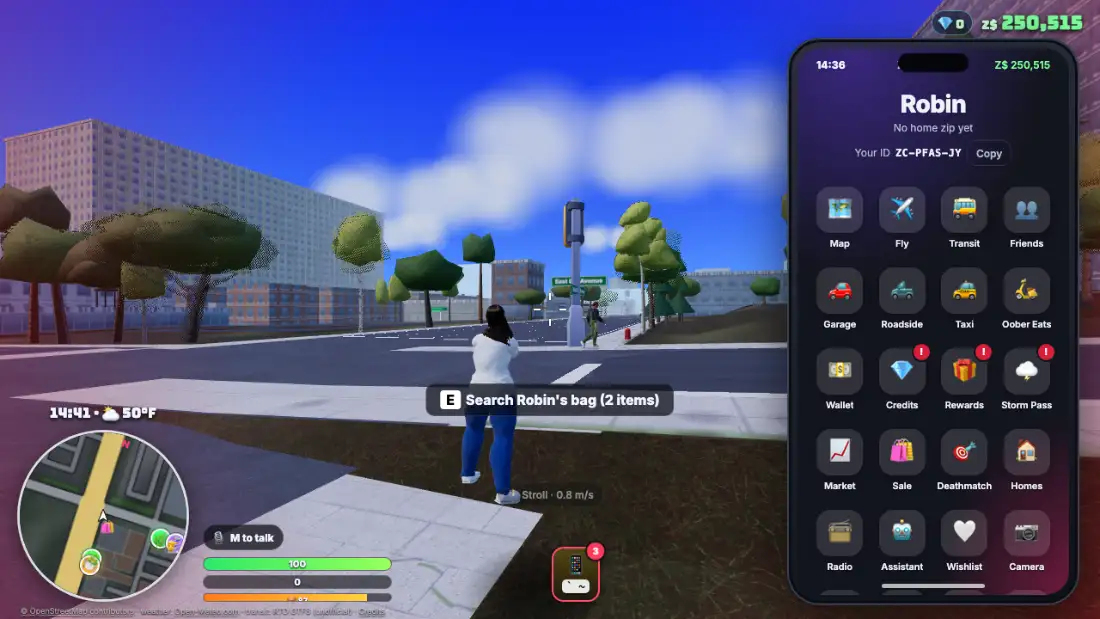
The apps
| App | What it's for |
|---|---|
| 🗺️ Map | The big map (same as N): drag to pan, scroll to zoom, search any place, click to set a route, right-click for more |
| ✈️ Fly | SkyCab: fly to any US zip code, or to a friend who is online |
| 🚌 Transit | Buses and trains near you, next departures, your ride (in places with transit data, like Denver) |
| 👥 Friends | Your ID to share, add friends by ID or name, requests, invites, block |
| 🚗 Garage | Your cars, bikes and boats: deliver one to the nearest street, see how many you can keep |
| 🛻 Roadside | Out of fuel or stuck: call for help |
| 🚕 Taxi | Your taxi shift: fares, earnings, how fares work |
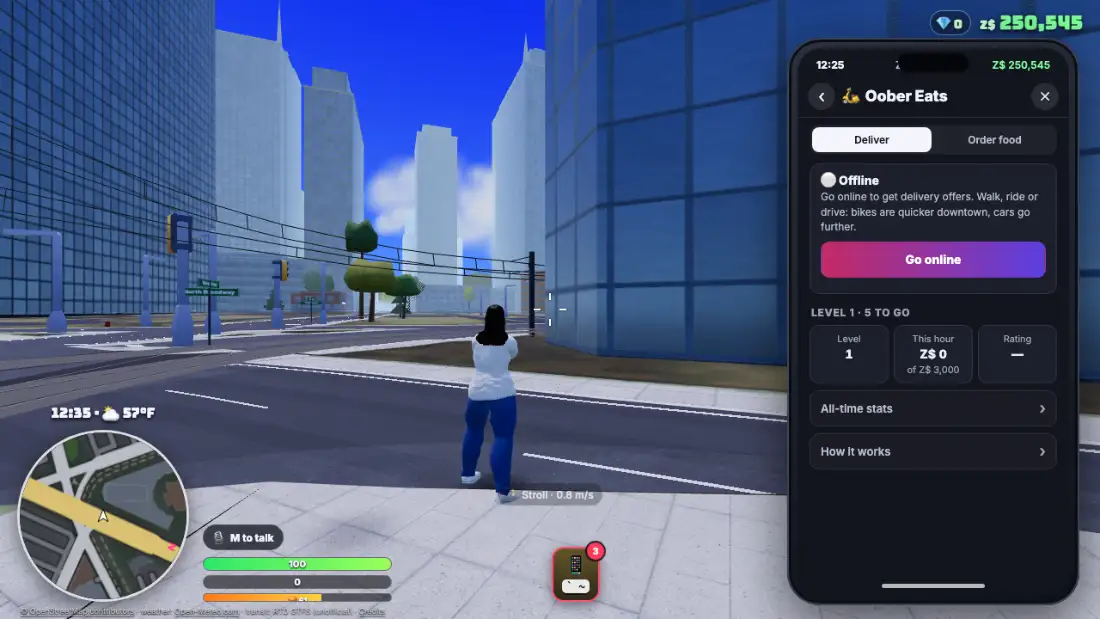
| 🛵 Oober Eats | Deliver food for money, or order food for yourself |
| 💵 Wallet | Your Z$ and what you earned and spent this session |
| 💎 Credits | Zip Credits: packs, perks, history, receipts, monthly limit |
| 🎁 Rewards | The daily login streak: claim once a day |
| 🌩 Storm Pass | The season pass: tiers, challenges, claim rewards |
| 📈 Market | Buy and sell cosmetics with other players |
| 🛍 Sale | The storm-season sale |
| 🎯 Deathmatch | Find or start a match, invite friends |
| 🏁 Racing | Race lobbies, time trials, leaderboards, the Track Builder |
| 🏴 Crews | Your crew: members, bank, jobs, hideout, turf |
| 🔧 Chop | Chop shops you've found, tips, stolen-car reports (shows up once you have one) |
| 🪨 Trails | 4x4 trails near you, their ratings, your badges |
| 🦖 Dinos | Your stable: whistle a dino over, the Jurassic Ranch |
| 🏠 Homes | Real estate and your homes (same as K) |
| 📻 Radio | The car radio and Spotify |
| 🤖 Assistant | Your Robot Assistant |
| 🧭 Quests | Local quests near you today |
| 🏙 Zip Pride | Your zip's weekly score and the leagues |
| 🛡 Players | People near you: mute, block, report, voice volume |
| 🤍 Wishlist | Cosmetics you've hearted, with price alerts |
| 📷 Camera | Take a photo or a selfie |
| 🎞 Photos | Photo mode, your gallery and "Meet me here" links |
| 💊 Remodel | The Rapid Remodel Clinic |
| 📖 Guide | This guide |
| ⚙️ Settings | The settings screen |
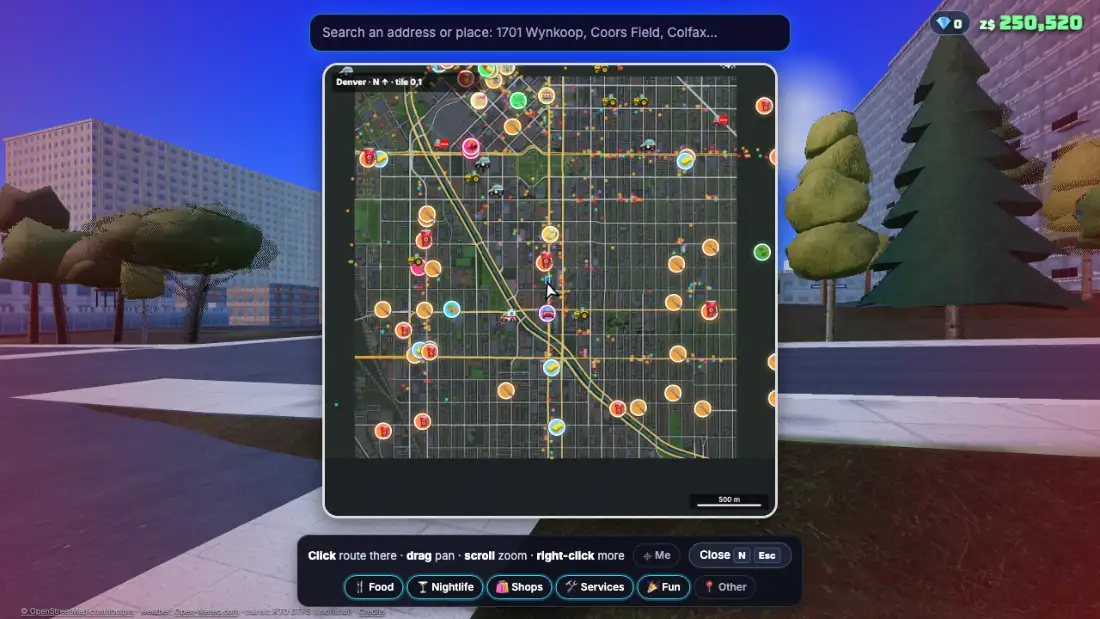
Some apps only show up when they apply: 🔧 Chop once you know of a chop shop, 🚌 Transit where there's transit, 🦖 Dinos and 📻 Radio while they're switched on, 🤖 Assistant where robots are open to you.
💵 Making money
The game's money is Z$. You earn it by playing and spend it on cars, homes, clothes, food, fuel and everything else. It can't be bought with real money. (Zip Credits, 💎, are a separate premium currency: see Zip Credits and purchases.) Phone → 💵 Wallet shows what came in and went out.
Ways to earn
| Work | How it works | Where |
|---|---|---|
| Venue and NPC jobs | Staff inside shops, bars, banks and clubs hand out jobs: deliveries, errands, hold-ups, bigger multi-step jobs. Paid when the last step is done. Quit any time (the ✕ next to the job, or Backspace twice). | E to talk to staff; Esc → Play lists your jobs |
| Oober Eats | Go online, take offers from real restaurants (1 accepts, 0 declines), pick the food up, carry it to a real front door or apartment lobby. Pay grows with distance, plus tips; walk, skate, ride or drive. | Phone → 🛵 Oober Eats → Deliver |
| Taxi | Drive any cab and you're on duty: people hail you (✋), stop next to them or honk, agree a fare (take the meter, give a discount, or ask for more), drive them there, get tipped. | Get in a taxi; Phone → 🚕 Taxi |
| Racing | Win races (Z$ 120 / 80 / 50 for the podium), finish (Z$ 20), set a personal best or a track record. Up to Z$ 1,200 a day. | Phone → 🏁 Racing |
| 4x4 trails | Finish a trail for the first time today: Z$ 25 to 200 by how hard it is (Z$ 600 a day at most). | Phone → 🪨 Trails |
| Local quests | Short hunts and tours around the real places near you; a new set every day. | Phone → 🧭 Quests |
| Crew heists | Group jobs only a crew can start, split between the crew and its bank. | Phone → 🏴 Crews |
| Stolen cars | Take a parked car to a hidden chop shop and chop it for parts (it's a crime: expect the police). | Phone → 🔧 Chop |
| Rent | Own a building with flats and rent them out. | Homes (K) |
| Bounties | Take down a player with wanted stars to collect their bounty. | |
| Daily rewards and the Storm Pass | Claim the login streak once a day; the Storm Pass free track pays Z$ and items as you level up. | Phone → 🎁 Rewards, 🌩 Storm Pass |
| Zip Pride | Everything you do adds to your home zip's weekly score; the top zips (nationally, per state, and the weekend event winners) pay Z$ and a name-tag frame to everyone who helped. | Phone → 🏙 Zip Pride |
| Selling | Sell cars back, sell things to shops, sell cosmetics on the market (for Zip Credits). | Garage, shop counters, 📈 Market |
Guest characters earn the same way, up to a limit. See Guest vs linked accounts.
Where it goes
Cars and their tax and registration, fuel, insurance, mod-shop upgrades, homes, a lair, furniture, clothes and haircuts, food, guns and attachments, transit fares, the Robot Assistant, starting a crew.
Things that are not money
- Casino chips are play chips: you get a free stack and a daily allowance, and you can win prizes, but chips can't be bought, sold or turned into Z$, Zip Credits or anything else.
- Arcade tickets come from playing the arcade machines (a few Z$ a play) and only buy prizes at the arcade counter.
- Wood, brick and metal you harvest with the pickaxe are building materials, not cash.
Tips
- Pick work that fits how you like to play: Oober Eats on a bike is relaxed, taxi work is a driving game, racing pays the most if you're fast.
- Watch your fuel (the gauge shows miles to empty) and keep a little Z$ for the pump.
- Hungry? Eat. Food comes from shops, gas stations and Oober Eats.
🚗 Cars and vehicles
Getting a car
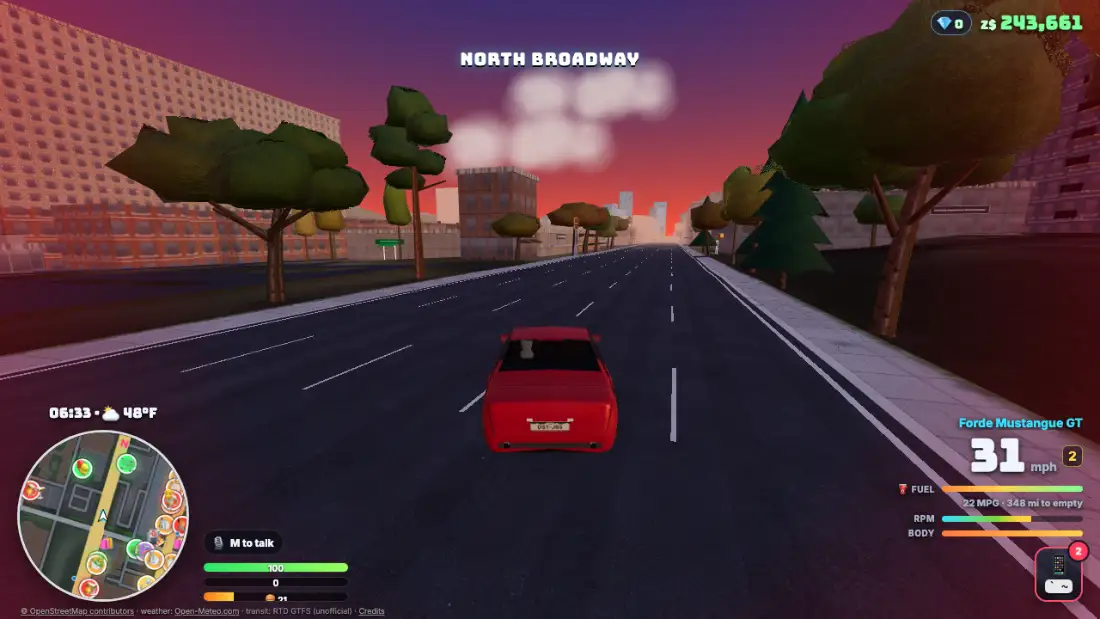
- Borrow one: walk up to a parked car and press E. Unlocked cars just open; locked ones start the lockpick game (and taking someone else's car is theft: see Crews and crime).
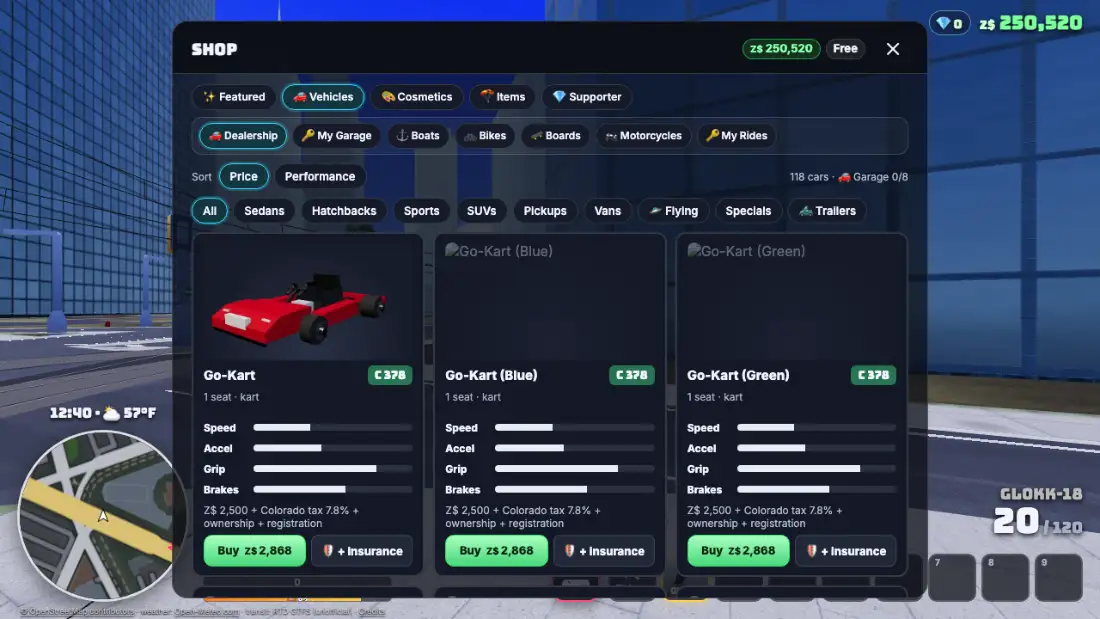
- Buy one: open the Shop (B) and go to the dealership. There are about 120 vehicles, from everyday sedans and pickups to supercars and a few flying cars. Prices include the state's tax and registration, and every car gets a licence plate.
- Get yours delivered: Phone → 🚗 Garage → Deliver drops one of your cars at the nearest street.
- How many you can keep: your garage, plus the garage of every home you own, plus your lair. A new car goes to the garage first, then the nearest home with room, then the lair. Boats have their own slots; stop your boat at a marina and press J to keep it in a slip there.
Driving
| Do this | Key |
|---|---|
| Gas / brake / steer | W S A D (controller: triggers + left stick) |
| Handbrake (drift) | Space |
| Nitro | Shift |
| Burnout | hold gas + brake while stopped, steer to swing the tail |
| Horn | H |
| Turn signals / hazards | [ ] \\ |
| Flip a car back over | R |
| Lock / unlock your car | L (it also unlocks as you walk up) |
| First person (with a real dashboard) | V |
| Radio station | ; and ' (Spotify Premium users can play their own music) |
| Get out | E |
Cars feel different: a pickup rolls, a sports car grips, a drift car slides. Dirt roads and snow are slippery. Crashes dent and break cars for real; a wreck catches fire and blows up a few seconds later, so get out. Fill up at a gas station or charger (E at a pump); if you run dry, Phone → 🛻 Roadside.
Mod shops
Every real auto shop on the map is a mod shop. Drive one of your own cars onto the pad and stop: the menu opens (U reopens it). Engine, brakes, tyres, suspension, drift parts, paint, wraps, body kits, custom horns. What a shop offers depends on what kind of shop it is.
Insurance
Insure a car at the dealership or in your garage. If it's stolen, chopped or wrecked, insurance pays what the car is worth now (cars lose value with age and miles).
Other things to ride
- Bikes, boards, scooters and motorbikes: bought in the Shop (B). Pull tricks on boards and bikes for combo scores; little skate spots with ledges and rails appear around the city.
- Boats: ten of them, from a kayak to a cabin cruiser, bought at a marina and launched on any lake or river.
- Trailers: hitch one by backing your tow ball up to it and pressing Y. Boat trailers, car haulers and a tow dolly; E at a trailer works the ramps, straps and winch.
- Dinosaurs: seven species, from a quick raptor to a T. rex. Buy one (or earn one) at the Jurassic Ranch in Cheesman Park, then whistle it over from Phone → 🦖 Dinos. Space is each one's special move.
- 4x4 trails: real jeep roads in the mountains, rated by difficulty. A trail rig crawls them; a sedan won't make it. Phone → 🪨 Trails.
- Flying cars: G takes off and lands, Space / C go up and down.
- Transit: buses and trains run on their real schedules. Walk to a stop (it shows the next departures), board with E when the doors open, R rings for your stop, E gets off. Phone → 🚌 Transit.
- Skis and snowboards: in the mountains when there's snow, ski areas open their runs.
🏠 Homes and lairs
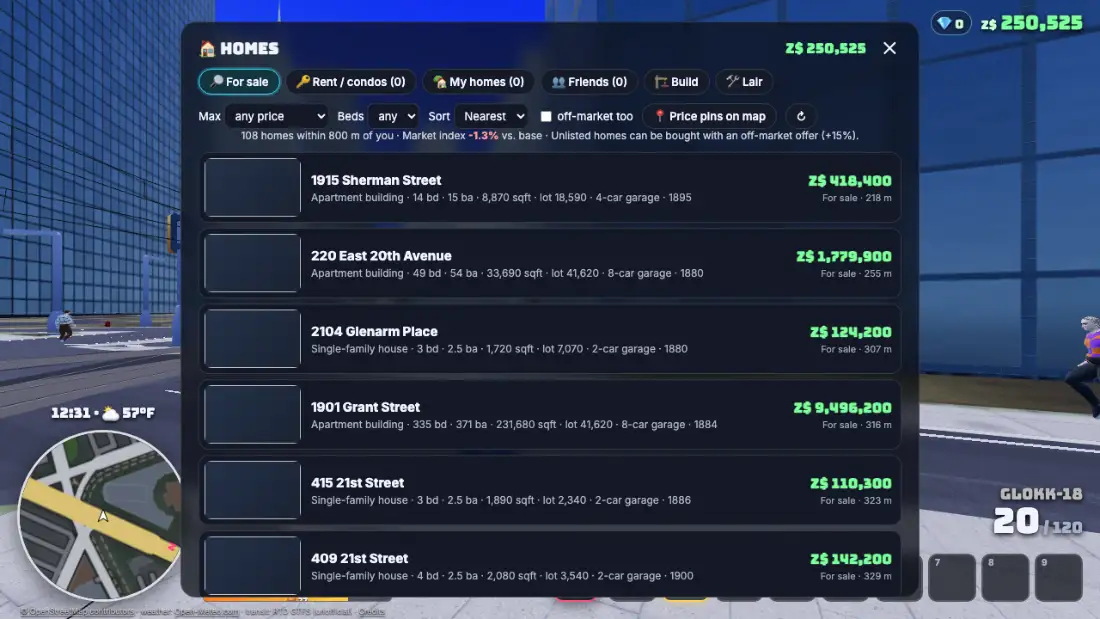
Every house and apartment on the map is real, and every one can be bought. Press K (or Phone → 🏠 Homes) for the listings near you and the homes you own. Buying a home needs a linked login (see Guest vs linked accounts).
Buying and living
- Listings show photos, the size, the price, the garage and how far away it is. Prices follow a real-estate market that drifts over time; selling costs a commission.
- Your home is yours to walk into (E at its door). Inside, press J to decorate: place furniture and decor.
- Garage: a home's garage counts toward how many cars you can keep. At its door, J parks your car inside.
- Storage: keep items and materials at home (your Robot Assistant can drop things off there too).
- Flats: own a building with units and rent them out.
Build your own
Homes → 🏗 Build. On a house you own outright, you can build a new house of your choice:
- Harvest wood, brick and metal with your pickaxe (trees, walls, scrap).
- Craft them into building supplies in your builder's yard (lumber, concrete, glass, steel, then kits). Crafting takes real time and keeps going while you're offline.
- Buy a blueprint: 14 styles (log cabin, A-frame, Craftsman bungalow, Denver Square, Victorian, modern box…) in small, medium or large.
- Place it on your lot (a see-through ghost you move around), and deliver supplies stage by stage. Friends can help. When the last stage is done, your house replaces the old one for everyone.
The lair
A lair is a secret underground garage under a home you own: the collectors' tier for people with a lot of vehicles. Buy or upgrade it in Homes (K) → 🛠 Lair.
| Tier | Space | Price |
|---|---|---|
| Underground garage | 10 | Z$ 6,000 |
| Big lair garage (with a workshop) | 20 | Z$ 15,000 |
| The full lair (lounge, workshop, turntable) | 40 | Z$ 32,000 |
Upgrading pays only the difference.
A car takes 1 space, a truck 2, a trailer 1-2, a boat 4-10, a dino 2-6. Whatever is in your lair can't be stolen and doesn't use a garage slot.
- Drive in: the hidden entrance on your lot (a ramp door or a vehicle lift) opens by itself when you drive toward it in your own vehicle. Drive down, and it's parked. J on the entrance parks at once.
- Drive out: E at a stored vehicle; you start at the bottom of the ramp, the door opens, drive up.
- On foot: E at the entrance, or the ▼ LAIR door in your house's garage.
- Decorate: J anywhere in your lair (props, floors, paint, lights, a sign).
- Visitors: by default, whoever may enter your house may come down too; change it in Homes → 🛠 Lair.
- Boats go in and out through a water channel; dinos can be stabled there too.
🏴 Crews and crime
Crews
A crew is your group of friends in the game: a name, a short tag over everyone's head, a colour, a motto, a shared bank, crew-only heists, a hideout and turf. Phone → 🏴 Crews. Crews need a linked login.
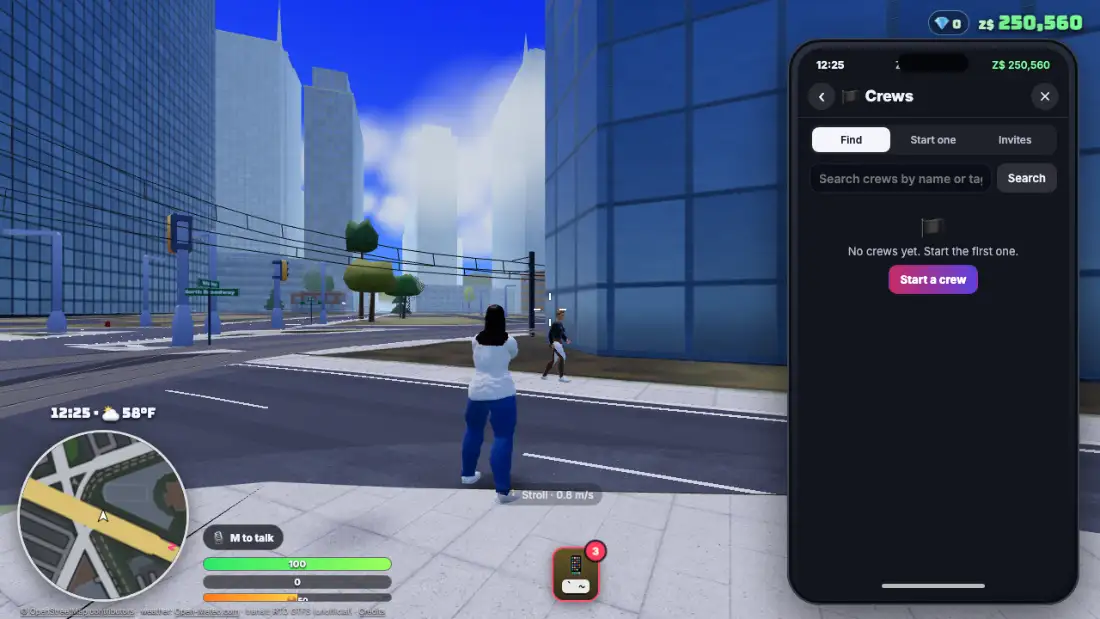
- Start one: Phone → 🏴 Crews → Start one. Pick a name (3-24 characters), a tag (2-4 letters or numbers) and a colour. It costs Z$ 2,500.
- Join one: get invited by a crew's leader or an officer, or apply from the public list (Find).
- Size: up to 30 members: one leader, up to 6 officers, the rest members.
- Leaving: any time. Leaving (or being removed) means you can't join or start another crew for 12 hours.
- Talking:
/c messagein chat, or the app's Chat tab. Crew members show on your map, and you can ping a spot.
The crew bank
The bank fills from a cut of every crew job (20% by default; the leader sets 0-40%) and from members' own deposits. Officers and the leader spend it on crew things (the hideout, a rename). The leader can pay a member out, but only a little at a time, and only to members who've been in the crew for two days. Every movement is in the crew's log, which everyone can read.
Heists
Only a crew can start these, and they need at least 2 of you together (within 300 m, online, not on another job):
| Heist | What you do | Pay per person (before the crew's cut) |
|---|---|---|
| 🚚 Armoured truck intercept | Reach the truck before it leaves, crack it open together (two of you close for 15 s), get the cash to the drop-off | Z$ 1,250 |
| 📦 Convoy delivery | Take the truck from the depot to the drop-off, with two of you there when it arrives | Z$ 1,100 |
| 🏦 The downtown job | Meet at a real bank: an inside crew holds the vault, a lookout watches, a driver waits for the getaway | Z$ 2,200 (inside crew a bit more) |
Heists earn wanted stars, so expect the police.
The hideout and turf
- Hideout: a shared underground garage for the crew, bought from the bank where an officer stands (Z$ 20,000, with two bigger tiers). Only members can find the entrance and go in; park your own cars there.
- Turf: crews claim zip codes by doing crew things there. Rivals can contest a zip; whoever has more influence after 24 hours holds it. Held turf pays the bank a small share of crew activity there.
Crime and the police
Shooting people, stealing cars, robberies and heists earn wanted stars (★ on your screen). Police come after you along the roads, with lights and sirens:
- At 1-2 stars they try to arrest you: stop next to an officer and you're busted (a fine and a short hold).
- At higher stars they ram you and then shoot.
- They only know where you are while they can see you. Get out of sight and stay hidden: the stars drop one at a time, then clear.
Drunk driving also draws police attention.
Stealing cars and chop shops
- Stealing: pick a parked car's lock (E at a locked car starts the lockpick game: move the mouse to find the sweet spot, hold to turn), or tow it away on a tow bar (Y). The alarm goes off, you get a wanted star, and the owner (if it's a player's car) is told.
- Chop shops are hidden, shabby garages that move every few days. Nothing marks them on the map until you've been close to one. After a theft you sometimes get a tip text with a circle around one.
- Inside (drive the stolen car to the door and press J, or knock with E on foot): the mechanic will
- swap the VIN and plate (a fee, then a two-hour wait): the car becomes yours, with a salvage title;
- chop it (two minutes): cash, metal for car mods and salvaged parts.
- Heat: every job makes a shop hotter, and a hot shop can be raided: the car goes back, the job and the fee are lost, and you get more stars.
- Crews can run a chop shop and take a cut of the work done there.
- Owners: insure your cars (see Cars and vehicles) and report a theft from Phone → 🔧 Chop.
Phone → 🔧 Chop lists the shops you've found, tips and reports.
🏁 Racing
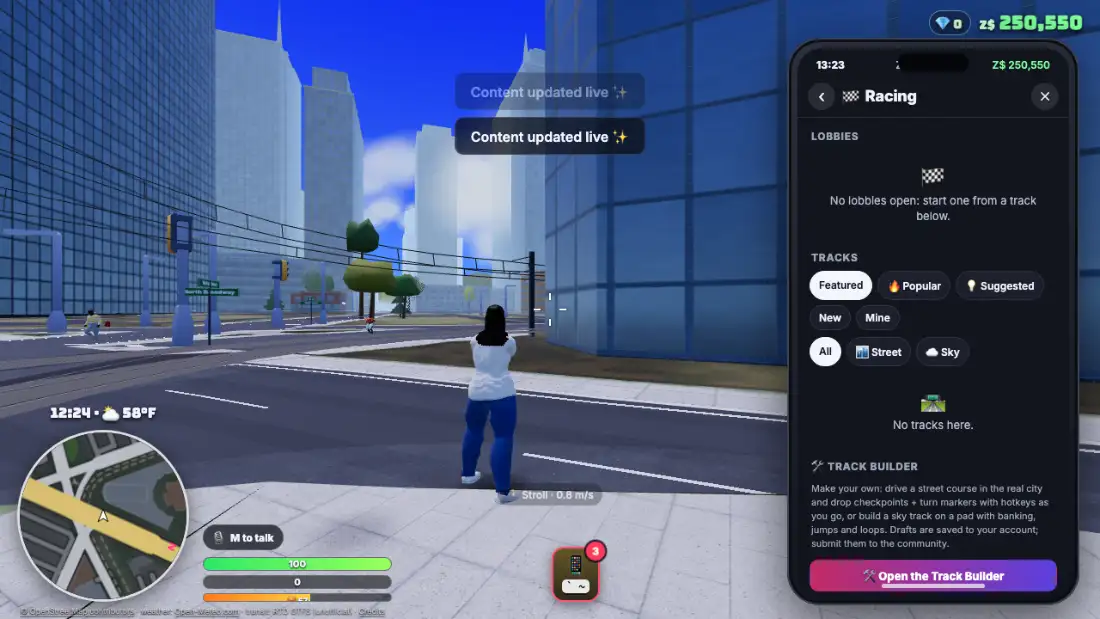
Phone → 🏁 Racing (also in the pause menu). Street circuits run on the real roads (traffic and pedestrians are cleared off the course for you); sky tracks float high above the city with banked turns, jumps and loops.
Racing other players
- Join an open lobby, or open one from any track: pick laps (1-10), a class (Open, Karts, Sedans, Sports, Muscle, SUVs, Hypercars) or one fixed car, 1-12 racers, collisions on or ghost mode, time of day and weather. Invite friends, ready up, and the host starts.
- The grid: a 3-2-1 countdown. Leaving the grid early puts you back.
- During the race: R takes you back to the last checkpoint, Tab shows the standings. Miss a checkpoint and you're sent back to it. Your race car never runs out of fuel, and nobody can take it.
- After: the results, then a vote for the next track. You go back exactly where you were before the race.
- Joined late? You watch from the stands (Space follows the next car).
Time trials
⏱ Time trial on any track: solo, every lap timed, racing the ghost of your own best lap (cyan) and of the track record (gold). Leaderboards per track and class: all time, this week, and your friends. Only clean laps count.
Rewards
| Z$ | |
|---|---|
| 1st / 2nd / 3rd (a race of 2+ racers, 45 s or longer) | 120 / 80 / 50 |
| Everyone else who finishes | 20 |
| A new personal best on a track (once per track a day) | 30 |
| A new track record | 200 + the Track Record title |
Up to Z$ 1,200 a day. A race win also counts for your zip's Zip Pride.
Build your own track
Phone → 🏁 Racing → 🛠 Track Builder.
Street track: drive it. Start a new street track and drive the course. While the builder is open:
| Key | Does |
|---|---|
| F | A checkpoint here (the first is the start / finish) |
| Q | A turn marker: the racing line goes through it |
| X | Record the line: a turn marker at every turn you drive |
| B | Back at the start: close the lap. Anywhere else: the finish line (a sprint) |
| C | Circuit or sprint |
| L | Laps 1-10 |
| G | The start grid here, facing your way |
| Backspace | Undo |
| P | Preview lap: a ghost car drives your route |
| I | Name it, check it, test drive it, submit it |
| Y | Stunt props: boosts, ramps, jumps, loops, wall rides |
Sky track. ☁️ Sky puts you on a building pad in the sky. F drops a point where you are; PgUp / PgDn raise and lower it, [ / ] bank it, J makes a jump, L a loop.
Drafts save by themselves (10 at most, on any device). A submitted track goes to 💡 Suggested, where everyone can race it, like it and rate its difficulty; enough racers and likes move it up to 🔥 Popular, and the best get ★ Featured.
💈 The barber and the wardrobe
Your character
Change your body, face, skin, walking style and name colour any time with Customize (C on foot, or the pause menu). Body shape has 16 sliders (build, muscle, chest, waist, hips, legs, height and more) and 7 body types to start from. Hairstyles you own can be re-styled here for free.
The barber 💈
Walk into a barber shop or salon and sit in the chair (E). A mirror camera shows your face while you shop.
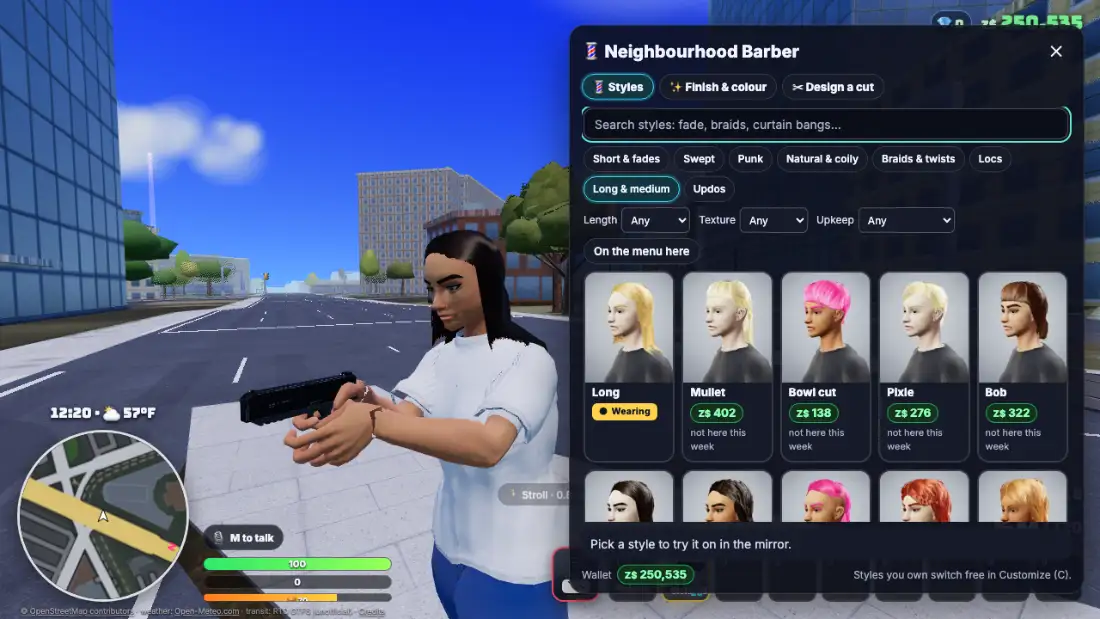
- Styles: 51 hairstyles in 8 families (short cuts and fades, long, updos, locs, braids, coily, swept, spiky), with search and filters for length, texture and upkeep. Each style has its own sliders (fade height, fringe, length…); buying a style gets you every variation.
- This week's menu: each barber only sells part of the catalogue each week. A style you own can be restyled at any barber.
- Finish and colour: shine, frizz and grey are free; colour treatments (with a second colour) are bought once and then work with every style.
- Design a cut: make your own cut from six numbers.
Clothes 👕
Press P for your wardrobe: a picture of what you're wearing next to everything you own. Click a slot to see what you own for it; click again to take it off. Everyone starts with a white tee and blue jeans.
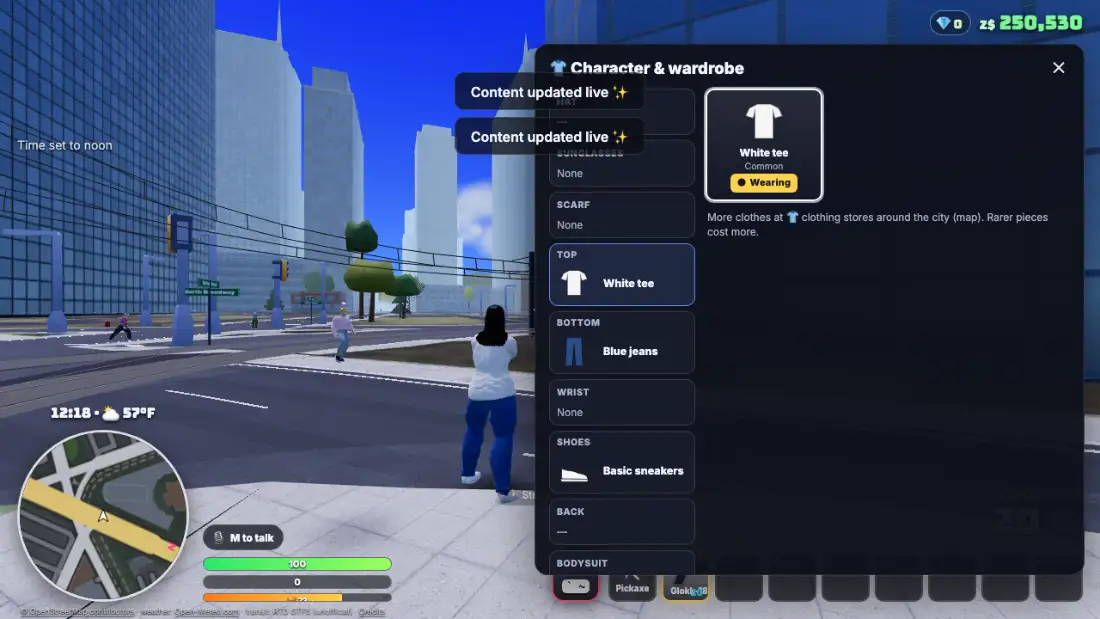
- Clothing stores: walk into a clothing store and use the racks and the checkout. Each store has a weekly theme and stock with rarities, and a try-on that shows the piece on you before you buy.
- Real clothes: hoodies, jackets, puffers, shirts, dresses, coats and scarves are real 3D garments that hang and move; shoes are real shoes.
- Underwear and swimwear are wardrobe items too, with an underwear designer for your own colours and patterns.
- Cosmetics: rare character skins, hats, back items, gun skins and car wraps come from the Shop (B), the season sale, the Storm Pass, store finds and the market. Click one to try it on first. Press . (or the middle mouse button) while looking at another player to see what they're wearing and how to get it; ♡ it to add it to your wishlist.
The Rapid Remodel Clinic 💊
Phone → 💊 Remodel changes your character's sex over a few minutes, keeping your hair, style and wardrobe (the underwear adjusts to fit). It costs Z$ and has a cooldown before you can do it again.
🤖 The Robot Assistant
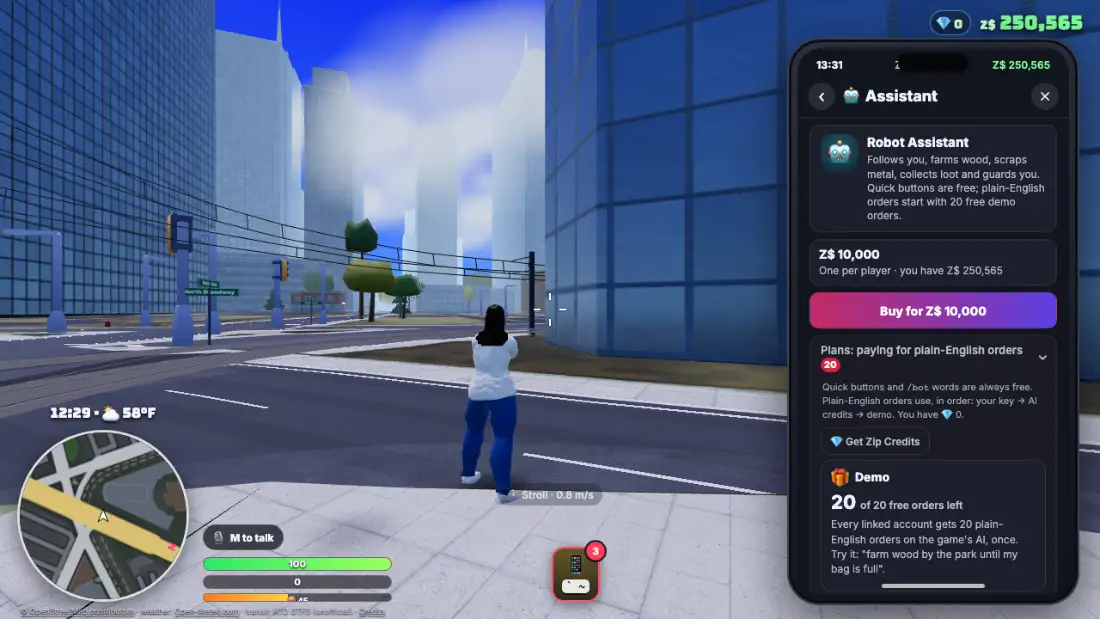
A robot companion that follows you around and works for you. Phone → 🤖 Assistant. A robot costs Z$ 10,000 and needs a linked login (guests see a "Link your account to get a robot" button instead).
What it does
- Follows you on foot (it walks; if you drive far away it heads home).
- Works: chops wood, scraps metal, collects loot and items around you, and drops what it gathers off at your home's storage.
- Guards you: it steps in against hostile people nearby, and backs off to recharge when its battery runs low.
- Talks: little speech bubbles about what it's doing. You can rename it.
It keeps working while you're online and nearby.
Giving orders
- Quick buttons in the app (Follow, Stay, Come here, Guard me, Farm wood here, Collect loot, Scrap metal, Store at home, Recall…) and
/botchat words are always free. - Plain English ("go chop some wood by the river and bring it home") is worked out by an AI. Each order is paid from the first of these you have:
- Your own AI key: unlock it once (💎 500), then use your own AI provider as much as you like.
- AI credits: packs bought with Zip Credits (100 orders for 💎 100, 500 for 💎 400, 1,500 for 💎 1,000). One credit per order; a credit comes back if the order never reached the AI.
- Free demo orders: 20 per login, for good.
The app always says which one paid and what's left. Your login's credits and demo orders are shared by all your characters.
🔑 Guest vs linked accounts
You can play two ways:
- As a guest: no sign-up. Your characters live in this browser. Clearing your browser data can lose them.
- Linked: your characters belong to a login (Google, or a username and password). Play them on any device, and they're safe if your browser forgets things. A login holds up to 12 characters.
You must be 13 or older to play or to make a login.
What guests can do
Almost everything: drive, work jobs, deliver food, race, fight, play deathmatch and storms, shop, change your look.
Earnings for guests stop at a cap: Z$ 5,000 earned in total and Storm Pass tier 5. Past that, nothing is lost: what you earn is held for you (up to Z$ 20,000 and about 5 more pass tiers) and paid out the moment you link. A little chip on screen shows how much is waiting. Nothing else stops working.
Guests can't:
- trade with other players, use the player market or the season sale;
- start, join or apply to a crew;
- buy or rent a home, buy land or blueprints, or buy a lair;
- host their neighbourhood;
- buy Zip Credits;
- own a Robot Assistant;
- tip a courier when ordering food.
Each of these shows a "needs a linked account" message with a one-tap Google link.
Linking
Tap the link button in any of those messages, or go to Esc → Account. Linking with Google keeps everything: your characters, money, cars, homes, cosmetics, friends, crew, Storm Pass progress and Zip Credits all move onto the login, and the held earnings are paid out at once.
If that Google account already has characters, nothing is overwritten: the game shows both sets side by side and adds yours beside them. If there isn't room for all of them, you can link just the character you're playing.
Logins, characters and devices
Esc → Account has your login (username and password, or Google), the devices you're signed in on, and your character library: each character has a permanent ID (like ZC-ABCD-12) and you can add a character you already have on another device by its PIN or by approving it from there. Quit · switch character in the pause menu goes back to your characters.
💎 Zip Credits and purchases
Two currencies
- Z$ is the game's money. You earn it by playing and it can't be bought directly.
- Zip Credits (ZC, 💎) can be bought with real money, earned in some events, or given by us. Everything ZC buys can also be reached by playing (with Z$, by earning it, or from other players on the market).
Phone → 💎 Credits (or Esc → Store & rewards) has the packs, perks, your history and receipts.
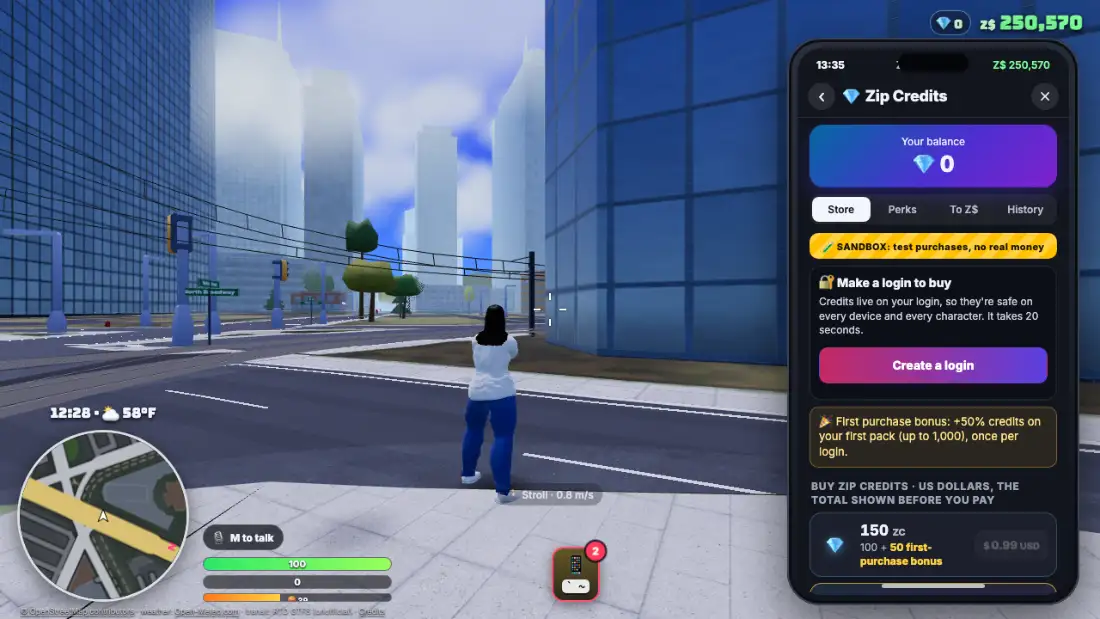
What ZC is for
- Premium cosmetics in the Shop and the Featured store page, and the season sale.
- The Storm Pass premium track and tier skips.
- 💎 Perks: Z$ boosts for a few days, two extra garage slots, an extra boat slot, priority delivery, a Roadside plan, a SkyCab pass, a few special cars.
- Robot Assistant AI credits.
- The player market, where cosmetics are bought and sold between players for ZC.
- Turning ZC into Z$ (up to a weekly limit).
Nothing random is sold. No random boxes, packs or spins for money or ZC: you always see exactly what you get before you buy.
Buying Zip Credits
- You need a login, and you must be 18 or older. The first time you try to buy, the game asks your birthdate. It's self-declared, kept on your account, and can't be changed afterwards (if you made a mistake, ask us). Under 18, you can't buy with real money, and everything else in the game stays open to you.
- Packs from $0.99 to $49.99, about 100 ZC per dollar, with up to 20% bonus ZC on the bigger packs and a one-time bonus on your first pack. The price in US dollars, the ZC you get and any bonus are shown before you pay; sales tax or VAT, where it applies, is shown on the checkout page.
- Payment is handled by Stripe; the game never sees your card number. The checkout asks you to tick a box agreeing to the Terms and to the credits being delivered right away.
- Delivery: ZC lands on your login as soon as Stripe confirms the payment, usually within seconds. If it hasn't arrived within an hour, contact us with the order ID from 💎 Credits → History → Receipts.
- Spending limit: set a monthly limit in 💎 Credits → History → Monthly spending limit.
ZC is store credit for ZIPCODE only: it has no cash value, never expires, and can't be cashed out, withdrawn, moved off your login, or sold for real money.
Refunds
From the Terms (section 5): because ZC is delivered immediately, purchases are final and non-refundable, except:
- unspent ZC within 14 days of purchase, on request with your order ID;
- when something you paid for wasn't delivered;
- where the law where you live gives you a right to a refund.
If you live in the EU or UK, you agree that ZC is delivered at once and that you therefore lose your 14-day right of withdrawal once it is delivered (the checkout asks you to confirm this).
If a payment is refunded, reversed or charged back, the ZC it gave you is taken back. If you already spent it, your balance can go below zero, and spending and trading are frozen until it's back above zero.
Read the full Terms before you buy. On test servers the store runs in a "sandbox" mode that says so on every screen; no real money is charged there.
🛡 Safety and reporting
ZIPCODE is a public game with strangers in it. Be decent: no harassment, hate, threats, sexual content, sharing anyone's personal information (including your own), spam or impersonation. Chat and names go through a filter, and moderators can mute, kick or ban.
Mute, block, report
Open the player sheet for someone (Mute · Block · Report · their voice volume) from:
- their name in chat: press T to open chat and click the name;
- the inspect card: look at them and press . (or middle mouse, or hold D-pad ↓), then 🛡;
- Phone → 🛡 Players: everyone near you, plus your muted and blocked lists.
| Mute | Block | |
|---|---|---|
| Their chat | hidden from you | hidden both ways |
| Their voice | silenced for you | no voice between you at all |
| Private messages | swallowed | refused both ways |
| Invites, friend and teleport requests | refused both ways |
Neither is announced to the other player. Mutes and blocks cover all your characters on all your devices.
Report someone with a reason (harassment, hate, sexual content, spam or scams, cheating, an offensive name, voice abuse, other) and an optional note. The report includes what they said recently, so moderators can see what happened. When several different people report the same player within a few minutes, they're muted until a moderator looks.
Voice chat
Players near you hear you. By default it's push to talk (hold M); Settings → Sound switches to an open mic, where M mutes and unmutes. Voice goes directly between players' browsers: the game doesn't record it, but other players could. You can turn any player's voice down or off in their player sheet.
Your own safety
- Don't share your real name, address, school, phone number or passwords in chat.
- Nobody from the game will ever ask for your password.
- Trades happen only through the game's own market; nothing in the game is worth real money, and anyone offering to buy or sell game items for real money is breaking the rules.
- You must be 13 or older to play, and 18 or older for real-money purchases and the casino.
Bugs and feedback
Press F7 (or Esc → 🐞 Report a bug · feedback). Say what happened and pick a category; you can include a screenshot. It sends your character, where you are and your graphics settings, never your password or chat.
❓ FAQ
Is it free?
Yes. Everything in the game can be earned by playing. Zip Credits are optional and never sold as random boxes.
Which zip codes work?
Any 5-digit US zip with streets of its own. Downtown Denver is built in; anywhere else is built from real map data the first time someone goes there (a few seconds, sometimes longer when the map servers are busy).
How do I play with friends?
Phone → 👥 Friends: share your ID (like ZC-ABCD-12) or add theirs, then ✈️ Fly → to a friend. You can also send a "Meet me here" link from 🎞 Photos: when they open it, they land right next to you.
I'm stuck in a wall / under the map.
Keep trying to walk out for a few seconds: the game notices when you're trapped or under the ground and pops you up onto the nearest open spot (and reports the place so it gets fixed). In a car, R flips or unsticks it. Still stuck? Press F7 and tell us where.
My car is gone.
Phone → 🚗 Garage → Deliver brings it back to the nearest street. If it was stolen and you had insurance, the payout comes when it's chopped or re-VIN'd.
I ran out of fuel.
Phone → 🛻 Roadside. Next time, the fuel gauge shows miles to empty and routes you to the nearest station when it's low.
How do I quit a job?
The ✕ next to it in the job list (top right), Esc → Play, or Backspace twice.
The game is slow on my computer.
Esc → Settings → Graphics. The default (Minimal) is the lightest; Auto adjusts to your frame rate. Turn on the FPS counter to see the effect. Closing other browser tabs helps too.
Do I lose things when I die?
What you were carrying drops in a bag where you fell (go back for it). Your Z$, cars, homes and cosmetics stay yours.
What happens in a storm?
Admins start storms now and then: a circle that closes in, with loot chests inside. Fallen players become ghosts. When it passes, buildings and builds in its area go back to how they were. /storm join drops you into a running storm.
Why can't my guest character buy a house / join a crew?
Those need a linked login. Link with Google in one tap from the message; you keep everything. See Guest vs linked accounts.
Where is the casino? Why was I asked my birthdate?
Casinos are walk-in venues. The casino and real-money purchases are 18+, so the game asks your birthdate the first time you try either. Casino chips are free play chips and can't be bought or cashed out.
Can I use a controller or play on my phone?
Yes to both: see Controls.
I found a bug.
Press F7 in the game. Thank you.
More: the Terms, the Privacy notice, Credits and the server status.